LifeSafety Power
Legacy Modernization · Design System · Configurator
Project shown under NDA · Real assets can be shown on a videocall.
LSP designs power systems integrated with the leading access control platforms in the industry — Mercury, HID, Genetec, Honeywell, LenelS2, Software House, Avigilon, Axis. The flagship engagement was a full modernization of the legacy MSM platform — the management system used by integrators across thousands of installations.
- Legacy MSM modernization — audited the existing platform, mapped pain points to flows, redesigned core surfaces while keeping engineering data structures intact.
- Design System from zero — token architecture, component library, documentation.
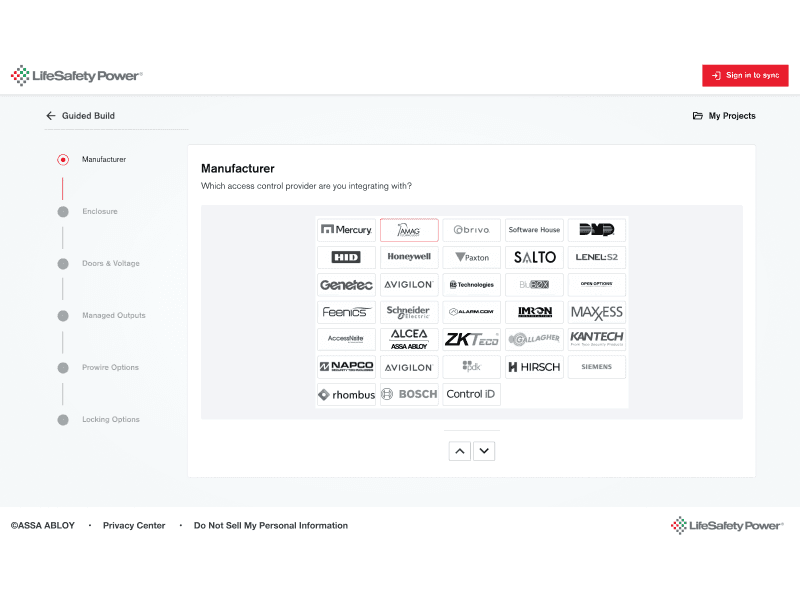
- Product Wizard — configurator at designcenter.lifesafetypower.com.
- PM enablement — coached the PM to integrate AI tools into ideation.
Modernization without disruption — the engineering data model defined what was real, design made it usable. Integrators didn't lose their muscle memory; they gained a system that finally felt current.
Modernizing the legacy that thousands of integrators depend on every day
The challenge
MSM is the management platform behind LifeSafety Power's installations across security integrators, field technicians, and access control administrators worldwide. For these users, MSM isn't a tool they open occasionally — it's where they live for hours a day, configuring, monitoring, and troubleshooting power systems that protect physical infrastructure.
The platform had two compounding problems.
An information architecture that fought its users. Years of feature additions had buried critical workflows under inconsistent menus and unclear hierarchies. Integrators were memorizing paths, not navigating them.
An interface from another era.Visually, MSM felt frozen in time — a daily reminder to users that the tool didn't match the modernity of the systems it controlled.
The constraint that defined everything
Everything could change — but the system had to stay operational. Thousands of integrators couldn't pause their work for a redesign. The new MSM had to feel like a quiet evolution to existing users while being a categorical leap forward in usability and visual quality.
That tension — total redesign without operational disruption — became the design principle for the entire engagement.
Reading the system before redesigning it
The entry point
The engagement started with a single artifact: the MSM operations manual. Sixty-eight pages of installation flows, multi-client configuration, NetLink registration, and parameter definitions — written by engineers, for engineers, documenting a system that thousands of integrators use without ever opening it.
That manual became the entry point. Before sketching a single screen, the work was to read MSM the way its users couldn't: as a complete information architecture exposed, with every workflow, hierarchy inconsistency, and naming decision visible at once.
The insight that changed the approach
The legacy interface didn't have a visual problem. It had an information architecture problem disguised as one.
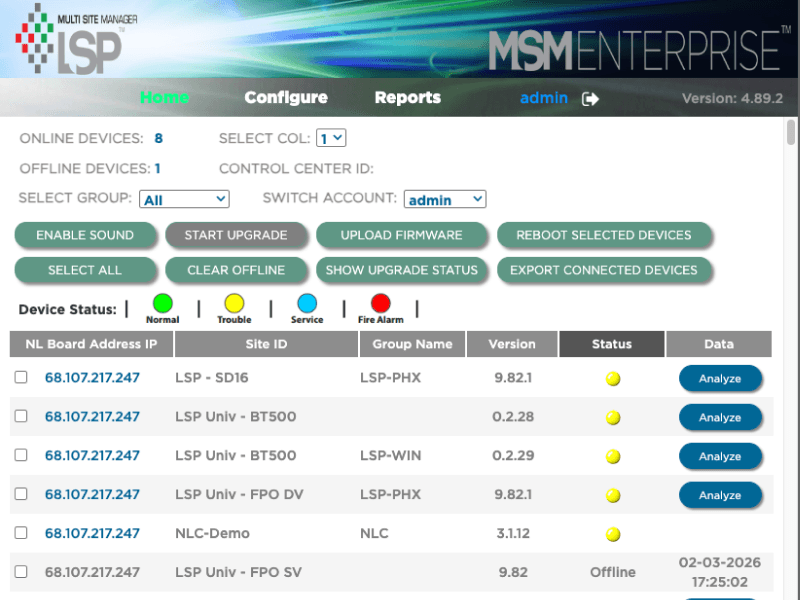
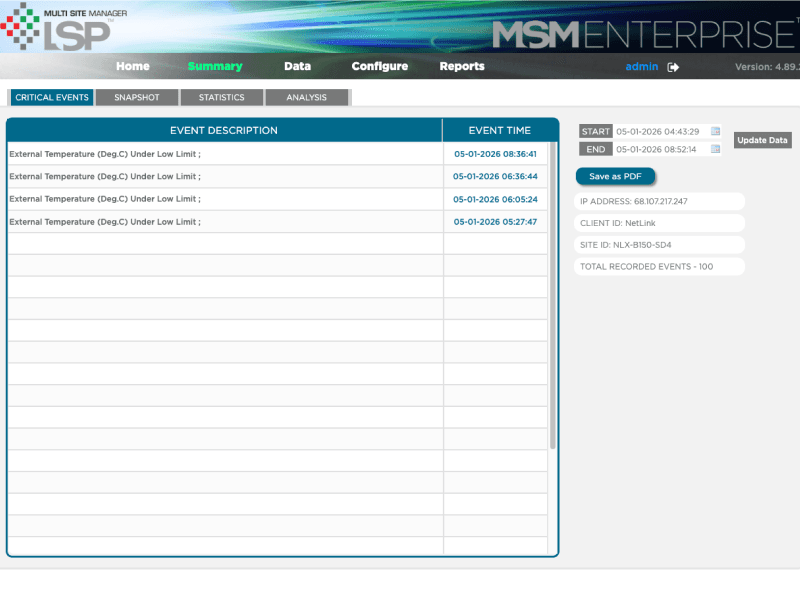
MSM exposed the system's data model almost 1:1 to the user: four parallel tabs (Critical Events, Snapshot, Statistics, Analysis) over the same dataset; status dots in five colors with a separate legend; parameter names lifted directly from the firmware (FP1 BATTERY RUNTIME TEST FAILED TOTAL). The interface reflected how engineers built the product, not how integrators operated it.
The redesign principle followed from that: organize information by the hierarchy of operator decisions, not by the hierarchy of the underlying data model.
Three decisions that defined the redesign
A redesign without operational disruption forces every choice to be defended twice: once for the new user, once for the integrator who already memorized the old paths. The decisions below were the ones where that tension was sharpest.
Hierarchy of operator decisions, not data structure
Flat table of NetLinks. Every device required equal attention. No way to triage at a glance.
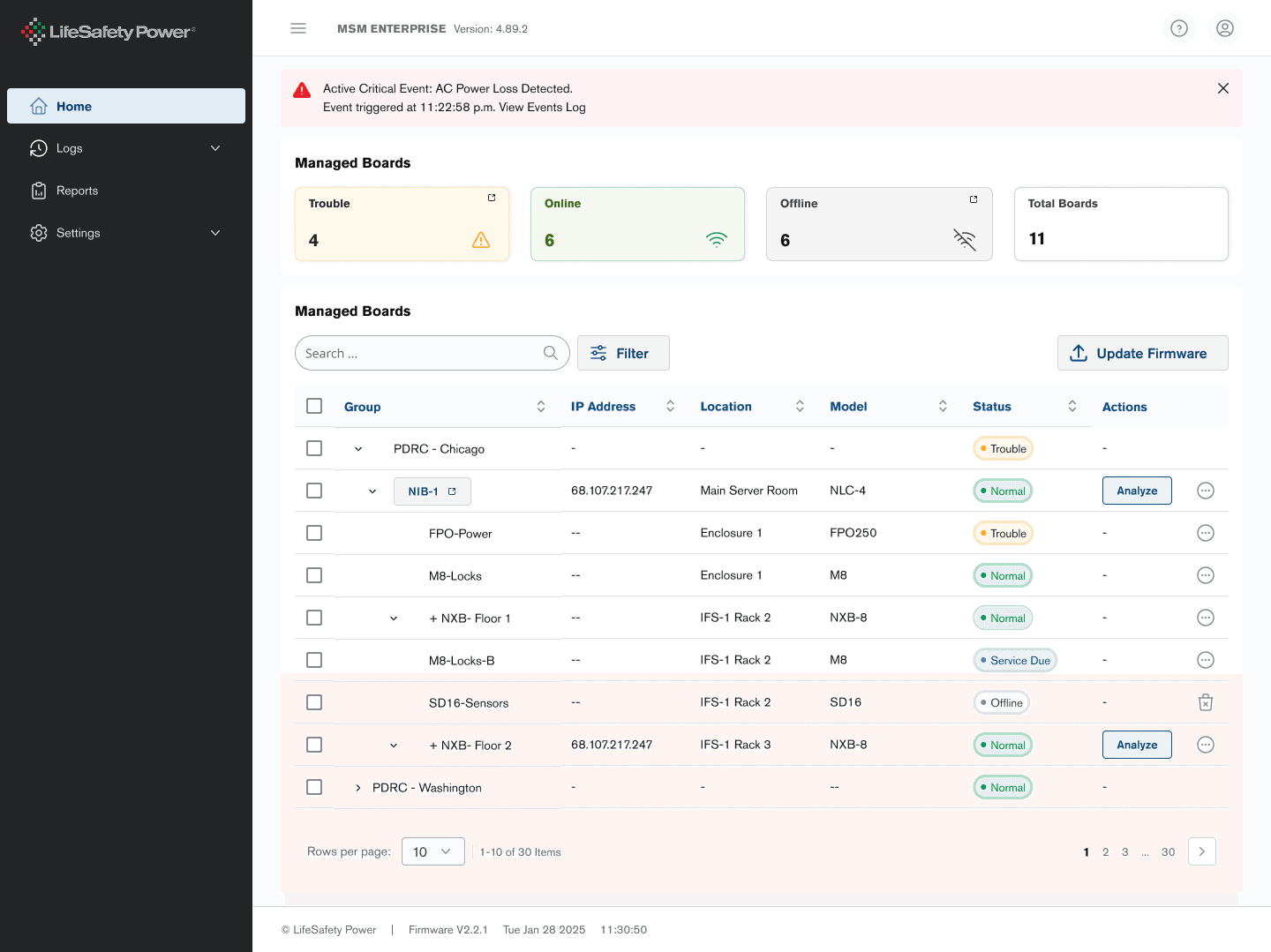
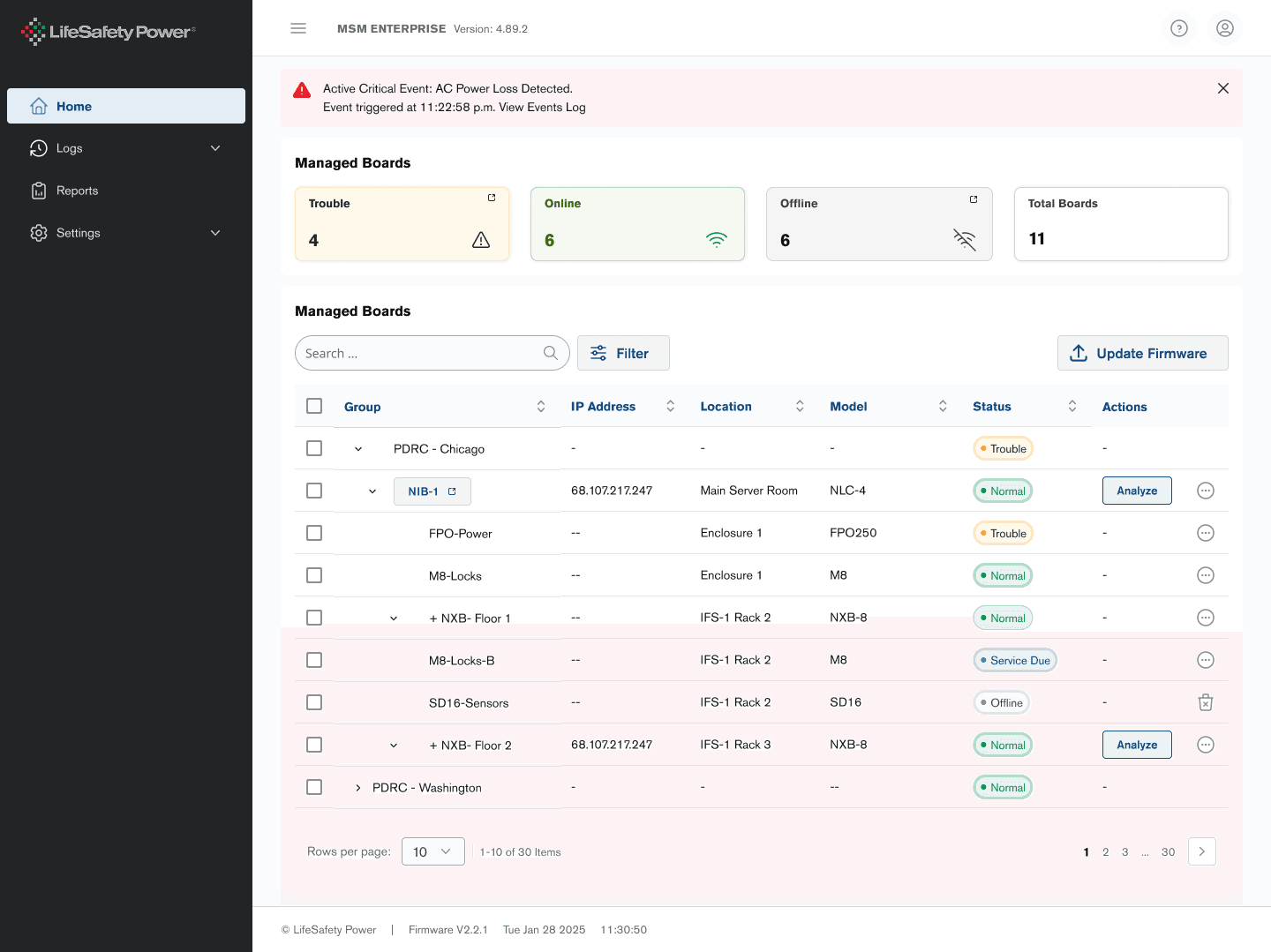
Active critical event banner at the top, status summary across the fleet (Trouble · Online · Offline · Total), 'Needs attention' as default filter, group/board hierarchy with visible parent-child relationships.
A redesigned navigation that would have replaced 'Home / Configure / Reports' with role-based entry points stayed intact — integrators rely on it for muscle memory.
Event-driven information architecture
Four parallel tabs (Critical Events, Snapshot, Statistics, Analysis) over the same dataset. Operator had to manually reconstruct context across tabs.
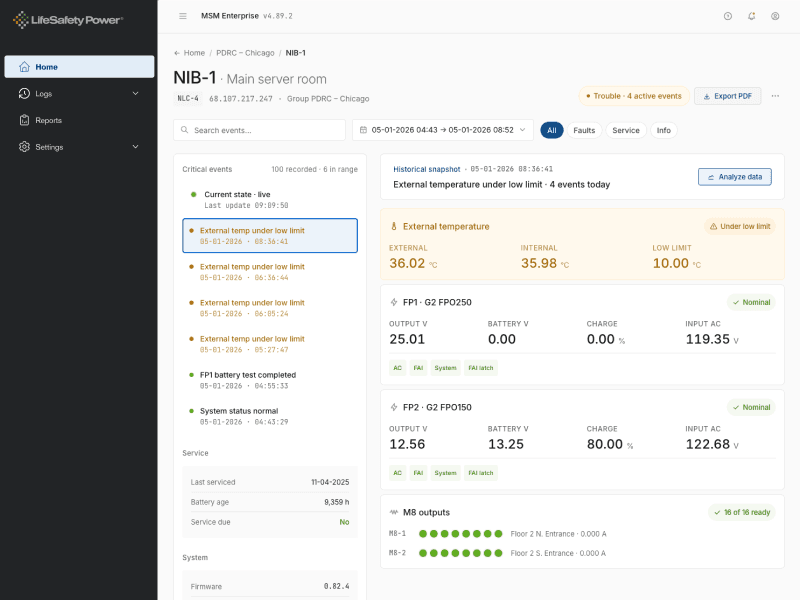
Single board detail page. Events feed as left-sidebar timeline. Main panel shows live state plus historical context for any event clicked. Statistics, charts, and raw data moved to a 'Power user' drawer — opt-in depth.
No parameter was deleted. Every metric the legacy exposed remained accessible — just reorganized around the operator's entry point rather than the data model's structure.
Modernization without disruption
Five-color status dots (green / yellow / blue / red / gray) with a static legend. M8 outputs as 8-LED grid — a convention integrators recognize across the entire LSP product line.
Status dots became named pills (Trouble · Normal · Service due · Offline) — text plus color, accessible and scannable. M8 LEDs preserved with a numeric summary above ('16 of 16 ready').
Muscle memory preserved; comprehension upgraded. Integrators see the same firmware-level grid they recognize from the field, framed by context that didn't exist before.
Modernization without disruption — the engineering data model defined what was real, design made it usable. Integrators didn't lose their muscle memory; they gained a system that finally felt current.
From four tabs to one event-driven workspace
Vibecoding Fleet View
Hierarchy validated in playable code with the PM, before the design system existed. Tokens, components, and styling came after the architecture proved itself, not before.
Where the work stands today
Validation
The strongest signal came from inside the product organization. LifeSafety Power's engineering lead — the same person who acted as proxy for the integrator field during discovery, and who knows MSM at the firmware level — recognized the new information architecture as clearer than the system he'd lived with for years.
That validation mattered more than a usability score: the person closest to the technical constraints saw the redesign reduce them, not hide them.
Coaching the PM through AI
Part of the engagement extended beyond design delivery. The PM co-piloted the project using Claude Code and Figma Make — guided on how to use them for ideation, architecture exploration, and validation cycles. The vibecoding sessions that defined the new hierarchy before the design system existed were the tangible output of that coaching.
By the end of the engagement, AI tools were no longer my workflow — they were the team's.
Reflection
Legacy modernization gets framed as a visual problem because that's what stakeholders see first. The harder, less visible work is the information architecture underneath — and the discipline to leave intact what users already know.
Modernization without disruption isn't a slogan. It's a permission structure for what design is allowed to change and what it has to leave alone.
MasteryTalk PRO
Founder Project · End-to-End Product Ownership